GB WhatsApp Privacy Settings Masterclass for 2026
Privacy is the number one reason users switch to GB WhatsApp, and the privacy settings inside the mod are unmatched. From per contact visibility rules to ghost level stealth, GB WhatsApp gives you full control over how others see you on WhatsApp. This masterclass covers every privacy option, what it does, and how to combine them into a setup that fits your life.
Why GB WhatsApp Privacy Settings Stand Out
The official WhatsApp privacy menu offers a handful of basic toggles. GB WhatsApp takes the same idea and turns it into a deep customization suite, with options for online status, blue ticks, typing, recording, status views, profile photos, and even activity on the official app. Each setting can be configured globally, per contact, or scheduled for specific times.
How to Access GB WhatsApp Privacy Settings
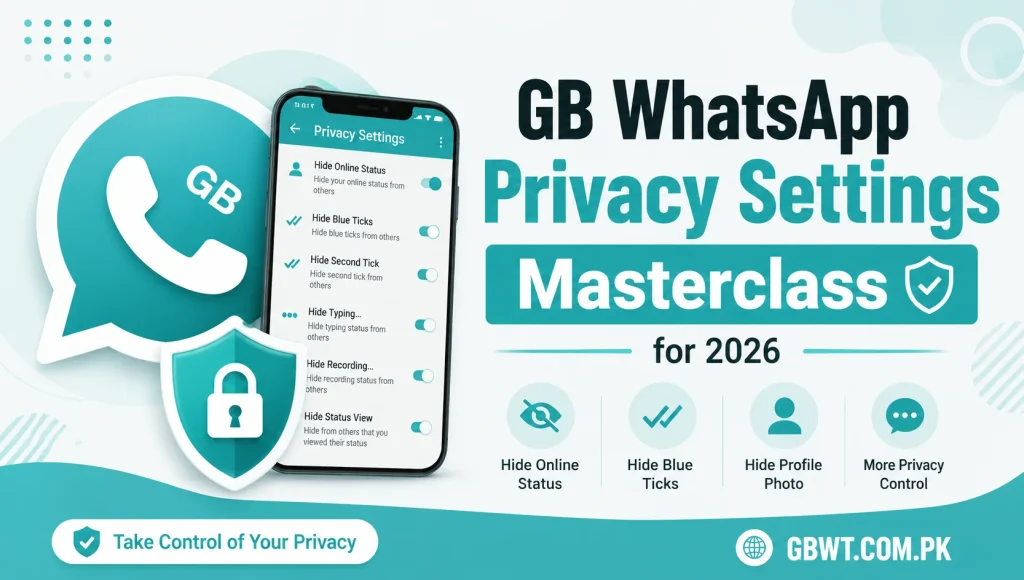
Launch GB WhatsApp, tap the three dot menu, and choose GB Settings. Navigate to Privacy and Security, and you will find a long list of options grouped into categories like Chat Privacy, Status Privacy, and Online Privacy. Every setting includes a short description, so you can experiment without worry.
Most Useful Privacy Settings Explained
Hide Blue Ticks
Hides read receipts in one to one and group chats. The sender sees a double gray tick instead of blue, so they do not know you have read the message.
Hide Second Tick
Prevents the delivery confirmation tick from appearing. Useful when you want total invisibility, but not recommended for everyday use, since it can confuse senders.
Freeze Last Seen
Keeps your last seen stuck at the last time you were online. You can still see other people last seen normally, which is a major advantage over official WhatsApp.
Hide Online Status
Prevents the green Online indicator from showing when you are using the app. You appear offline to everyone, even while actively chatting.
Disable Typing Indicator
Stops the typing animation from being sent to the other person. They have no idea whether you are typing a reply, recording a voice note, or ignoring them.
View Status in Stealth
Lets you watch statuses without the creator knowing. The view is not registered on the server, so your name does not appear in the viewers list.
Custom Privacy Per Contact
GB WhatsApp lets you set different privacy rules for individual contacts. This is perfect for users who want full Ghost Mode with most people, but want to be visible to close friends and family. Open Custom Privacy, add a contact, and choose which rules apply to them.
Schedule Privacy Settings
Some users want different privacy behavior depending on the time of day. GB WhatsApp supports scheduled privacy, where you can set hide blue ticks to enable during work hours and disable in the evening. The schedule runs automatically, so you do not have to remember to toggle settings.
Best Privacy Combos for Different Users
For Maximum Privacy
Combine hide blue ticks, hide second tick, freeze last seen, hide online status, and disable typing. This creates full Ghost Mode, where you are completely invisible to everyone.
For Balanced Privacy
Keep blue ticks visible for close contacts, hide them for everyone else, freeze last seen, and disable typing. This lets you maintain real connections while staying private from acquaintances.
For Business Use
Hide last seen and blue ticks for non clients, show them for saved business contacts, and use custom auto reply for after hours. This is a professional setup that respects your time.
Privacy and Account Safety
Privacy settings do not replace account security. Always enable two step verification in GB WhatsApp, set a strong PIN, and link a recovery email. Avoid sharing your verification code, and do not install GB WhatsApp clones from unknown sources, since they can contain malware that bypasses your privacy settings.
Backup Your Privacy Setup
After fine tuning your settings, take a screenshot or write down the rules. If you ever reinstall GB WhatsApp, you can restore the setup in minutes using your notes. This is much faster than trying to remember each toggle.
Common Privacy Mistakes
Do not enable hide blue ticks and then expect to see other people blue ticks, since the default mode hides both. Do not forget to whitelist close contacts, as full Ghost Mode can hurt important relationships. Finally, do not rely on privacy settings alone for sensitive data, since no app can protect you from a compromised device.
FAQs
Can I set different privacy rules for different contacts?
Yes, GB WhatsApp custom privacy lets you configure visibility rules per contact, so you can show or hide activity for specific people.
Will hide blue ticks also hide my own blue ticks?
Yes, by default, hiding your blue ticks also hides blue ticks from others. Use custom privacy to whitelist contacts you want to see receipts from.
Does freeze last seen affect my ability to see others last seen?
No, freeze last seen only freezes your own last seen. You can still see other people last seen normally.
Can I schedule hide online status for work hours?
Yes, GB WhatsApp supports scheduled privacy, so you can set online status to hide during work and re enable in the evening automatically.
Are privacy settings synced across devices?
No, privacy settings are local to each device. If you use GB WhatsApp on multiple phones, you will need to configure the rules on each one separately.